
Microsoft Copilot pricing in Australia: licences, costs and what to budget for
Microsoft Copilot pricing in Australia explained, including licence options, Copilot Business, Cowork, Copilot Studio, Microsoft Foundry and the costs beyond the licence.

Last reviewed: October 2026
Microsoft Copilot pricing changes quickly.
Just when Microsoft's licensing structure starts to make sense, a bundle can change, another AI model can appear, a new consumption-based capability can launch, or the way Microsoft describes an existing Copilot experience can shift.
That makes any static Copilot pricing guide inherently time-sensitive.
The information below reflects Microsoft's Australian pricing and licensing position as at October 2026. It should be treated as a current reference point rather than a permanent price list.
For business and enterprise buyers, Microsoft Copilot cost is also more complicated than a single per-user licence.
The commercial model can involve:
- an underlying Microsoft 365 licence such as E3 or E5
- the paid Microsoft 365 Copilot add-on
- Microsoft 365 E7, which already includes Copilot
- Microsoft 365 Copilot Business for smaller organisations
- usage-based services such as Copilot Cowork
- Copilot Studio and agent consumption
- data readiness and governance
- implementation and adoption
This guide explains how Copilot pricing works in Australia, how Copilot licensing interacts with E3, E5 and E7, what the paid Microsoft 365 Copilot licence actually buys, where Cowork fits and how Microsoft Foundry differs from Copilot.
The three Copilot concepts businesses need to separate
One reason Copilot licensing becomes confusing is that several different Microsoft products and experiences contain the word Copilot.
For most business buyers, it helps to begin with three concepts.
1. Copilot Chat and the Basic experience
Microsoft Copilot Chat is available at no additional cost for eligible Microsoft 365 users with a Microsoft Entra account.
Microsoft's current documentation distinguishes between a Basic Copilot experience and the fuller paid Premium experience.
Basic access can include secure AI chat, web grounding and selected Copilot functionality within Microsoft 365 applications.
That means the free or included experience is no longer simply "Copilot in a browser".
Depending on the user's entitlement and application, Copilot functionality can appear within products such as Word, Excel, PowerPoint, Outlook and OneNote.
The important distinction is that the Basic experience does not provide the same priority access, automatic organisational grounding or complete feature set as the paid Microsoft 365 Copilot licence.
2. Microsoft 365 Copilot, the paid licence
Microsoft 365 Copilot is the paid enterprise Copilot licence.
Microsoft describes the capabilities unlocked by this licence as the Microsoft 365 Copilot Premium experience.
This distinction is important:
Premium describes the experience. Microsoft 365 Copilot is the licence.
The current Australian published price for the paid Microsoft 365 Copilot licence is AU$44.90 per user/month, paid yearly, excluding GST.
The paid licence adds capabilities including:
- priority access
- deeper Copilot integration with Microsoft 365 applications
- automatic grounding in organisational data
- Microsoft Graph
- Work IQ
- Copilot Search
- semantic indexing
- broader agent capabilities
- access to usage-based experiences such as Copilot Cowork
Microsoft explicitly describes Microsoft 365 Copilot Premium as the full add-on licensed experience.
3. Copilot Studio
Microsoft Copilot Studio is Microsoft's platform for building, deploying and managing AI agents. It is not an additional tier of the Microsoft 365 Copilot end-user licence. Its licensing and costs depend on how agents are developed, deployed and used.
What is included with Microsoft 365 Copilot?
Users with a Microsoft 365 Copilot licence can build and use supported internal agents within the Microsoft 365 environment at no additional Copilot Credit charge. This covers eligible business workflows using Copilot Chat and the Standard harness.
When do additional costs apply?
More advanced use cases, such as autonomous agents, publishing agents to external websites or applications, supporting users without Microsoft 365 Copilot licences, or using premium integrations and the GitHub Copilot harness, may require separately funded Copilot Studio consumption.
Microsoft offers three main payment options:
- Monthly prepaid capacity: AU$299.30 per month for 25,000 Copilot Credits (excluding GST), providing a shared pool of credits for agent usage.
- Pre-purchase plan: An upfront commitment to Copilot Credit usage over a 12-month period, with volume-based discounts of up to 20%. Suitable for organisations with predictable or significant consumption.
- Pay-as-you-go (PAYG): No upfront licence or minimum credit commitment. Actual Copilot Credit consumption is billed monthly through a linked Azure subscription.
Is a separate licence required to access Copilot Studio?
Not necessarily. Eligible Microsoft 365 Copilot users already have access to supported agent-building capabilities. For standalone Copilot Studio, authorised developers require appropriate access permissions or a Copilot Studio user licence, which is available at no additional per-user charge under the applicable licensing arrangements. The commercial cost is primarily associated with agent consumption rather than individual developer seats.
Commercial consideration: Organisations should distinguish between agent capabilities included in existing Microsoft 365 Copilot licences and separately billable agent consumption. Connecting agents to external applications, deploying them beyond Microsoft 365 or running advanced automated workflows should be assessed for Copilot Credit usage, connector licensing and any third-party service charges before implementation.
Copilot Chat versus the paid Microsoft 365 Copilot licence
The distinction is no longer simply "free Copilot versus Copilot inside Word and Excel".
Microsoft now provides selected Copilot functionality in Microsoft 365 applications without the full paid Copilot add-on.
The more useful distinction is Basic versus Premium.
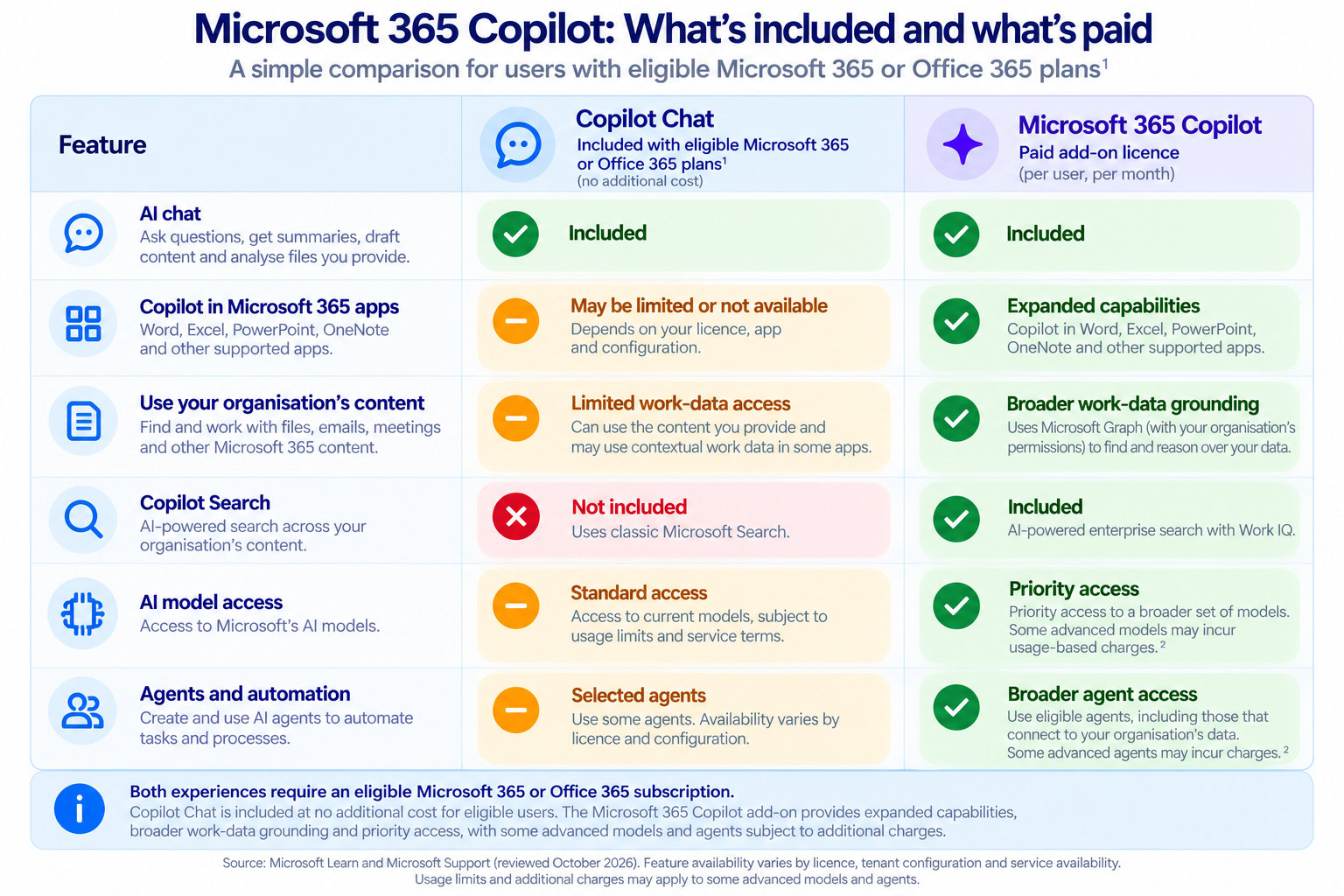
Microsoft says the Premium experience provides priority access and deeper organisational grounding through Microsoft Graph, Work IQ, Copilot Search and semantic indexing.
This distinction matters for procurement.
Seeing Copilot appear in Word, Excel or another Microsoft 365 application does not by itself mean the user has been assigned the paid Microsoft 365 Copilot licence.
How Microsoft 365 licensing affects Copilot pricing
This is the other major piece of the puzzle.
The Copilot licence sits on top of, or in some cases inside, an underlying Microsoft 365 licence.
For larger organisations, the most relevant Microsoft 365 licensing comparison is often E3, E5 and E7.
Microsoft 365 E3
Microsoft 365 E3 does not include the paid Microsoft 365 Copilot licence.
Microsoft Copilot is available as a paid add-on.
The current Australian published price for Microsoft 365 E3 with Teams is AU$58.40 per user/month, paid yearly, excluding GST.
An E3 user who needs the full Premium Copilot experience can therefore be licensed as:
Microsoft 365 E3 + Microsoft 365 Copilot
Microsoft 365 E5
Microsoft 365 E5 also does not include the paid Microsoft 365 Copilot licence by default.
Microsoft Copilot is available as a paid add-on.
The current Australian published price for Microsoft 365 E5 with Teams is AU$89.80 per user/month, paid yearly, excluding GST.
An E5 user can therefore be licensed as:
Microsoft 365 E5 + Microsoft 365 Copilot
Microsoft's own licensing comparison confirms that E3 and E5 support Copilot as an add-on rather than including it natively.
Microsoft 365 E7
Microsoft 365 E7 changes the commercial comparison.
E7 became generally available in May 2026 and already includes the paid Microsoft Copilot licence.
Microsoft describes E7 as:
E5 + Microsoft Copilot + Microsoft Entra Suite + Agent 365
in one SKU.
Microsoft currently lists:
- Microsoft 365 E7 with Teams: AU$148.20 per user/month, paid yearly
- Microsoft 365 E7 without Teams: AU$135.40 per user/month, paid yearly
Both published prices exclude GST.
An E7 user therefore does not need another AU$44.90 Microsoft 365 Copilot licence added on top.
E3, E5 and E7 at a glance
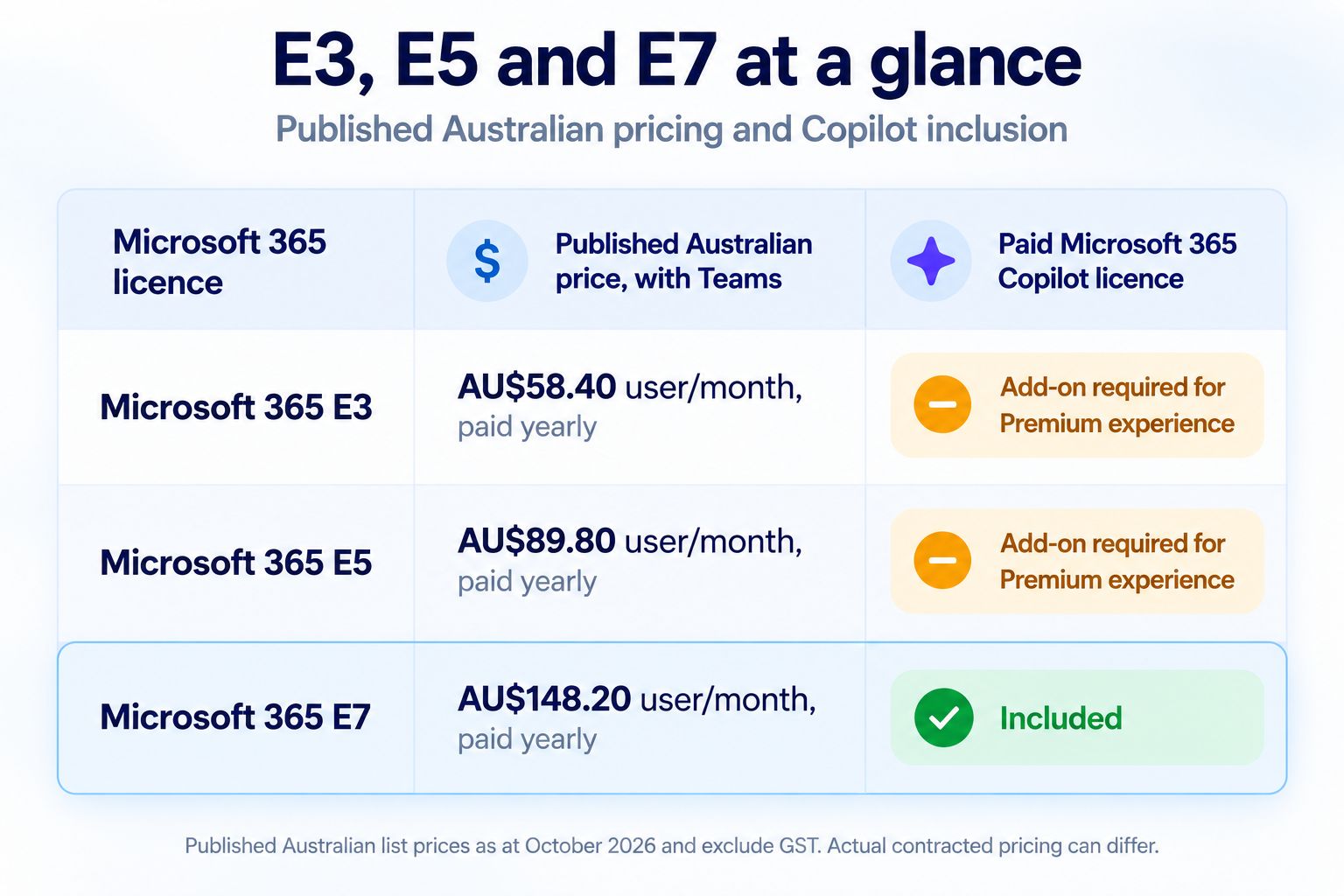
These are Microsoft's published Australian list prices as at October 2026 and exclude GST. Actual contracted pricing can differ.
E5 plus Copilot versus Microsoft 365 E7
For many enterprise buyers, this is a more useful comparison than simply asking what Copilot costs.
E5 + Microsoft 365 Copilot
This structure consists of:
Microsoft 365 E5
plus
paid Microsoft 365 Copilot licence / Premium experience
Using current published Australian annual-payment pricing:
- E5: AU$89.80 user/month
- Microsoft 365 Copilot: AU$44.90 user/month
The simple published-price total is therefore AU$134.70 per user/month, excluding GST, before considering negotiated discounts or other licence components.
Microsoft 365 E7
E7 is currently AU$148.20 per user/month, paid yearly, excluding GST.
That is more than the simple E5 + Copilot list-price calculation, but E7 includes additional functionality.
Microsoft describes E7 as including:
- everything in Microsoft 365 E5
- Microsoft Copilot
- Microsoft Entra Suite
- Agent 365
- additional agent observability, security and governance
- additional identity and network-access functionality
This means E7 should not be treated simply as "E5 with Copilot bundled".
An organisation comparing E5 + Copilot with E7 may also need to consider whether it would otherwise buy or require:
- Microsoft Entra Suite
- Agent 365
- agent governance
- agent identity controls
- secure network access
- broader agent security capabilities
For a wider discussion of these types of technology and sourcing decisions, see our guide to enterprise AI platform strategy for Australian organisations.
What is the Microsoft 365 Copilot price in Australia?
As at October 2026, Microsoft lists the paid Microsoft 365 Copilot licence, which provides the Premium Copilot experience, at:
AU$44.90 per user/month, paid yearly
excluding GST.
This is the Copilot add-on price.
It is not:
- the price of Microsoft 365 E3
- the price of Microsoft 365 E5
- the price of Microsoft 365 E7
- the price of Copilot Chat
- the price of Copilot Studio
For an organisation already using E3 or E5, AU$44.90 represents the published incremental Copilot license cost before negotiated pricing.
For an E7 user, the paid Microsoft 365 Copilot licence is already included.
Microsoft 365 Copilot Business
Smaller organisations have a separate Microsoft 365 Copilot Business offer.
Microsoft currently lists:
- regular starting price: AU$31.40 per user/month, paid yearly
- promotional starting price: AU$26.91 per user/month, paid yearly
The prices exclude GST.
Microsoft says an eligible Microsoft 365 Business subscription is required and the offer applies to organisations with up to 300 users.
The promotional price should not automatically be used as a long-term cost assumption because promotional terms can change.
Microsoft 365 Copilot Premium included AI models
As of October 2026, Microsoft has announced GPT-5.5 Instant, GPT-5.5 Thinking, GPT-5.6 and GPT-6 Sol within its Microsoft 365 Copilot ecosystem. It has also announced support for selected Anthropic Claude models.
However, the standard paid Microsoft 365 Copilot experience does not necessarily expose all these models through a manual model selector.
Copilot Chat generally offers Auto, Quick response and Think deeper modes. Microsoft can automatically select underlying models based on the task.
Consequently, the models announced by Microsoft should not be interpreted as guaranteed, individually selectable entitlements under every Premium licence.
Actual availability for Australian organisations depends on the Copilot experience, deployment status, tenant configuration and administrator settings.
Copilot Cowork — separately charged usage-based capability
Copilot Cowork provides explicit model selection, with Microsoft's current documentation listing GPT 5.5 Frontier, GPT 5.6 Sol, GPT 5.6 Terra, GPT 6 Astra, Claude Opus 5, Claude Sonnet 5 and Claude Fable 5.1.
Cowork requires a Copilot licence and usage-based billing through Copilot Credits. These charges are additional to the standard per-user Copilot licence.
For procurement comparisons, distinguish between models announced for the Microsoft Copilot platform, models available within the standard paid licence, and models accessible through separately charged usage-based capabilities.
Are ChatGPT and Claude available in Microsoft Copilot?
Yes. Microsoft Copilot supports AI models from both OpenAI (GPT) and Anthropic (Claude), although the standalone ChatGPT and Claude applications are not included in a Microsoft 365 Copilot licence.
Microsoft Copilot is a separate Microsoft product that integrates these AI models within Microsoft's own licensing, identity, administration, security and data protection arrangements.
OpenAI GPT models
Microsoft Copilot supports GPT models developed by OpenAI. Depending on the Copilot experience, these models may be automatically selected by Microsoft or manually selected by the user.
Anthropic Claude models
Microsoft Copilot also supports Claude models developed by Anthropic. Microsoft's Copilot Cowork documentation lists Claude Opus 5, Claude Sonnet 5 and Claude Fable 5.1 alongside OpenAI GPT models.
Availability of individual Claude models depends on the Copilot experience, licence, administrator settings and regional availability.
What this means for enterprise buyers
Microsoft Copilot is a multi-model AI platform that can use models developed by different providers rather than being tied exclusively to OpenAI.
However, accessing GPT or Claude models through Microsoft Copilot is not equivalent to purchasing standalone ChatGPT or Claude subscriptions. These remain separate products with their own interfaces, functionality, licensing and commercial arrangements.
Similarly, some advanced models and model-selection capabilities within Copilot Cowork involve separately billed usage-based charges rather than being included as unlimited access under the standard Microsoft 365 Copilot licence.
Where Copilot Cowork fits
Copilot Cowork is not another Microsoft 365 licensing tier.
It is an agentic experience available within the Microsoft Copilot environment.
Cowork became generally available to Microsoft 365 Copilot tenants in June 2026, and Microsoft introduced consumption billing as part of that release.
The critical commercial distinction is:
Paid Microsoft 365 Copilot licence
Primarily a fixed per-user subscription with unlimited consumption and usage of AI models within the Copilot interfact. (when Cowork is not selected)
Copilot Cowork
A usage-based experience that consumes Copilot Credits.
Microsoft's documentation says usage-based experiences require a user subscription licence and use Copilot Credits for applicable advanced and agentic workloads.
That means buying the paid Microsoft 365 Copilot licence will enable access to Cowork but to use Cowork credits or tokens will need to be purchased in addition to the Copilot Premium License. This is an important distinction.
How Copilot Credits work
Microsoft describes Copilot Credits as a common currency for eligible usage-based AI services.
Current services managed through Microsoft's usage-based billing framework include:
- Copilot Cowork
- apps built with Copilot Cowork
- Work IQ API
Microsoft says more services may be added over time.
Organisations can use combinations of:
- fixed licences
- prepaid Copilot Credits
- capacity packs
- pay-as-you-go billing
Administrators can also use Microsoft 365 cost-management tools to establish spending controls and monitor consumption.
How much does a Cowork task cost?
There is not necessarily one fixed price per task.
Microsoft says Copilot Credit consumption can vary according to factors including:
- models used
- amount of context retrieved
- runtime
- tools used
- work performed
Users can type /cost inside Cowork to see an approximate credit consumption figure for the current task.
Microsoft explicitly notes that /cost is an estimate and is not the authoritative billing record.
The broader governance implications of AI systems that can perform longer-running actions are covered in our guide to agentic AI governance.
What does Copilot Studio cost?
Copilot Studio is Microsoft's platform for building agents.
Microsoft currently publishes a prepaid capacity option of:
25,000 Copilot Credits for AU$299.30 per month
Microsoft also offers a pay-as-you-go model.
For users already licensed for Microsoft 365 Copilot, Microsoft says usage of agents published to Microsoft 365 Copilot is included in the licence.
Other deployment scenarios can use Copilot Credit capacity or pay-as-you-go billing.
That is why Copilot Studio cost should be assessed according to the actual agent scenario rather than assuming all agent interactions are either included or separately charged.
Microsoft Copilot versus Microsoft Foundry
Microsoft Copilot and Microsoft Foundry are both Microsoft AI offerings, but they solve different problems.
Microsoft Copilot
Microsoft Copilot is primarily an employee productivity and work AI environment.
It provides AI through areas such as:
- Copilot Chat
- Word
- Excel
- PowerPoint
- Outlook
- Teams
- Work IQ
- agents
- Cowork
Its commercial model is primarily based on Microsoft 365 licensing, with additional usage-based services layered on top.
Microsoft Foundry
Microsoft Foundry is an AI development platform.
It is intended for technical teams building custom:
- AI applications
- agents
- model-based services
- integrations
- retrieval systems
- AI workflows
The commercial model is based primarily on Azure and model consumption rather than a Microsoft 365 per-user licence.
A business licensing Microsoft 365 Copilot for employees is therefore making a different procurement decision from a development team using Microsoft Foundry to build a custom enterprise AI application.
This broader platform choice is discussed in our guide to enterprise AI platform strategy for Australian organisations.
The Copilot licence is not the whole cost
The published Microsoft 365 Copilot price is relatively straightforward.
Deployment costs depend much more heavily on the organisation.
Data readiness and permissions
Copilot operates within an organisation's existing Microsoft 365 information and permissions environment.
Potential preparation can include:
- SharePoint permissions
- site ownership
- information architecture
- oversharing
- external sharing
- sensitivity labels
- Microsoft Purview
- data classification
- retention
- data-loss prevention
An organisation with mature Microsoft 365 governance may require relatively little remediation.
An organisation with years of accumulated SharePoint content and broadly inherited permissions may face more work.
Security and governance
Relevant areas can include:
- identity
- access control
- Microsoft Purview
- agent permissions
- data-loss prevention
- audit
- information protection
- retention
- human approval
- agent monitoring
The requirement will differ according to the organisation, data and use cases.
Rollout and adoption
Implementation costs can also involve:
- internal IT
- user training
- communications
- use-case development
- change management
- support
- adoption analytics
- external implementation assistance
Those costs are separate from the Microsoft Copilot license cost.
Where Copilot licensing decisions can become expensive
Several areas are worth distinguishing when modelling the commercial position.
Looking only at the AU$44.90 Copilot price
The AU$44.90 figure is specifically the paid Microsoft 365 Copilot add-on licence.
An E3 or E5 user still has the cost of an underlying Microsoft 365 licence.
Comparing E5 + Copilot with E7 only on price
E7 includes additional capabilities through Microsoft Entra Suite and Agent 365.
Those inclusions may or may not matter to a particular organisation, but they change what is being compared.
Assuming the free experience has no Microsoft 365 integration
Basic Copilot functionality can now appear within Microsoft 365 applications.
The distinction is the depth of organisational grounding, priority access and advanced capability rather than simply whether Copilot appears inside an application.
Assuming the paid Copilot licence means unlimited Cowork
It does not.
Cowork uses Microsoft's usage-based Copilot Credit model.
Assuming model availability will remain static
Microsoft can add, remove or change GPT, Claude and other supported models independently of the licence itself.
What can be included in a Copilot business case?
A Microsoft Copilot business case can separate costs into five broad categories.
1. Underlying Microsoft 365 licensing
For example:
- Microsoft 365 E3
- Microsoft 365 E5
- Microsoft 365 E7
- Microsoft 365 Business Standard
- Microsoft 365 Business Premium
2. Paid Copilot user licensing
For example:
- Microsoft 365 Copilot
- Microsoft 365 Copilot Business
3. Usage-based AI
For example:
- Copilot Cowork
- Copilot Studio
- Work IQ API
- metered agents
- other Copilot Credit services
4. Technical and governance work
For example:
- permissions remediation
- SharePoint governance
- information protection
- Microsoft Purview
- security configuration
- agent governance
5. Implementation and adoption
For example:
- rollout
- training
- communications
- support
- use-case development
- adoption analytics
Separating these categories makes the difference between the headline Microsoft 365 Copilot price and the total deployment cost much clearer.
Frequently asked questions
How much does the paid Microsoft 365 Copilot licence cost in Australia?
As at October 2026, Microsoft lists the paid Microsoft 365 Copilot Premium licence, which provides the Premium Copilot experience, at AU$44.90 per user/month when paid yearly, excluding GST.
A qualifying Microsoft 365 licence such as E3 or E5 is generally required underneath it unless Microsoft Copilot is already included through a suite such as Microsoft 365 E7.
Is Copilot included with Microsoft 365 E3?
The full paid Microsoft 365 Copilot licence is not included in E3.
It can be purchased as an add-on.
Is Copilot included with Microsoft 365 E5?
The full paid Microsoft 365 Copilot licence is not included in E5.
It can be purchased as an add-on.
Is Copilot included with Microsoft 365 E7?
Yes.
Microsoft 365 E7 includes Microsoft Copilot alongside Microsoft 365 E5, Microsoft Entra Suite and Agent 365.
What is the difference between E5 plus Copilot and E7?
E5 + Copilot combines the Microsoft 365 E5 licence with the paid Microsoft 365 Copilot add-on.
E7 includes E5 and Microsoft Copilot, but also adds Microsoft Entra Suite and Agent 365.
Is Copilot Chat free?
Copilot Chat is available at no additional cost for eligible Microsoft 365 users.
That Basic experience is different from the paid Microsoft 365 Copilot Premium experience.
Does free Copilot work in Word and Excel?
Selected Basic Copilot capabilities can appear in supported Microsoft 365 applications.
The paid Microsoft 365 Copilot licence provides deeper application integration, priority access and automatic grounding in organisational data.
Is paid Microsoft Copilot unlimited?
Core functionality under the Microsoft 365 Copilot user subscription is primarily licensed through a fixed per-user fee rather than being charged for every prompt.
However, certain advanced or agentic experiences use usage-based billing.
Cowork is one example.
Does Copilot Cowork cost extra?
Yes. Cowork uses usage-based billing measured in Copilot Credits.
The amount consumed varies according to the task and resources used.
Can Microsoft Copilot use GPT-6?
Microsoft's current Cowork documentation lists GPT 6 Astra among available model options in supported environments.
Can Microsoft Copilot use Claude?
Yes, in supported experiences.
Microsoft's current Cowork documentation includes Opus 5, Claude Sonnet 5 and Claude Fable 5.1.
How much does Copilot Studio cost?
Microsoft currently lists a Copilot Studio capacity pack of 25,000 Copilot Credits for AU$299.30 per month.
Pay-as-you-go is also available.
Final considerations
The simplest way to understand Microsoft Copilot pricing is to stop thinking about Copilot as one licence.
There are several layers.
For an enterprise organisation, the licensing position might be:
Microsoft 365 E3 or E5
plus
Microsoft 365 Copilot paid licence / Premium experience
plus
Cowork or other Copilot Credit consumption
Alternatively:
Microsoft 365 E7
which already includes
E5 + Microsoft Copilot + Microsoft Entra Suite + Agent 365
Copilot Studio sits alongside this as the platform for building and operating agents.
Microsoft Foundry sits further away again as an Azure-based AI development platform.
The introduction of Cowork, Copilot Credits and a growing choice of AI models also means Microsoft Copilot cost is no longer purely a question of multiplying a licence price by the number of users.
A more useful procurement question is:
What Microsoft 365 licence do we already have, which Copilot experience do we need, and what consumption-based services are likely to sit on top of it.
Disclaimer
Disclaimer
Independent publication: Enterprise AI Procurement is an independent publication and is not affiliated with, sponsored by, authorised by or endorsed by Microsoft Corporation. Microsoft, Microsoft 365, Microsoft Copilot and associated product names are trademarks of their respective owners.
Publicly available information: This article has been prepared using publicly available information, primarily sourced from Microsoft's official website, published pricing schedules, licensing documentation, product announcements and other publicly accessible online materials. The content represents independent research, interpretation and procurement analysis.
Pricing and licensing information: All pricing, licensing arrangements, product capabilities and usage-based charges reflect publicly available information reviewed as at the stated publication date. Such information may change without notice. Published prices may differ from negotiated enterprise agreements, reseller quotations, promotional offers and customer-specific commercial arrangements. Unless otherwise stated, prices are in Australian dollars (AUD) and exclude GST.
Accuracy and verification: Reasonable efforts have been made to ensure the information is accurate and current at the time of publication. However, Enterprise AI Procurement does not guarantee the accuracy, completeness or continued currency of the information. Readers should independently verify pricing, licensing requirements, product availability and contractual terms directly with Microsoft or an authorised licensing provider before making procurement or purchasing decisions.
Independent analysis and opinions: Any comparisons, interpretations, recommendations and opinions expressed in this article are those of Enterprise AI Procurement and are provided for general educational and informational purposes. They do not represent the views, policies or commercial positions of any current or former employer.
Limitation of liability: To the extent permitted by applicable Australian law, Enterprise AI Procurement accepts no liability for loss or damage arising from reliance on the information contained in this article. Nothing in this disclaimer excludes, restricts or modifies any rights or remedies that cannot lawfully be excluded under the Australian Consumer Law or other applicable legislation.
General information: This article does not constitute legal, financial or other professional advice. Readers should seek appropriate independent advice where necessary before making commercial, contractual or procurement decisions.
Sources
All pricing and licensing references below are direct Microsoft sources.
- Microsoft 365 Copilot plans and pricing, Australia
- Microsoft 365 Copilot enterprise pricing
- Microsoft 365 Enterprise plans and pricing, including E3, E5 and E7
- Microsoft 365 Copilot Business
- Microsoft Copilot Studio
- Microsoft Copilot overview and Basic versus Premium experiences
- Microsoft E3, E5 and E7 Copilot licence comparison
- Microsoft Copilot extensibility licensing and cost considerations
- Microsoft Copilot Credits and usage-based billing
- Microsoft Copilot Cowork credit usage
- Microsoft Copilot Cowork model choices
- Microsoft Copilot Cowork updates
- Microsoft Entra Suite and Microsoft 365 E7